
NewPremium lifetime access — just $30↗

Every frame your PC
was built to deliver.

The KRX Utility puts Windows tuning, hardware insight, and game-ready optimizations in one clean app — less background noise, smoother frames, faster response.

Works with the hardware you already own
NVIDIAAMDINTELASUS ROGMSIRAZER
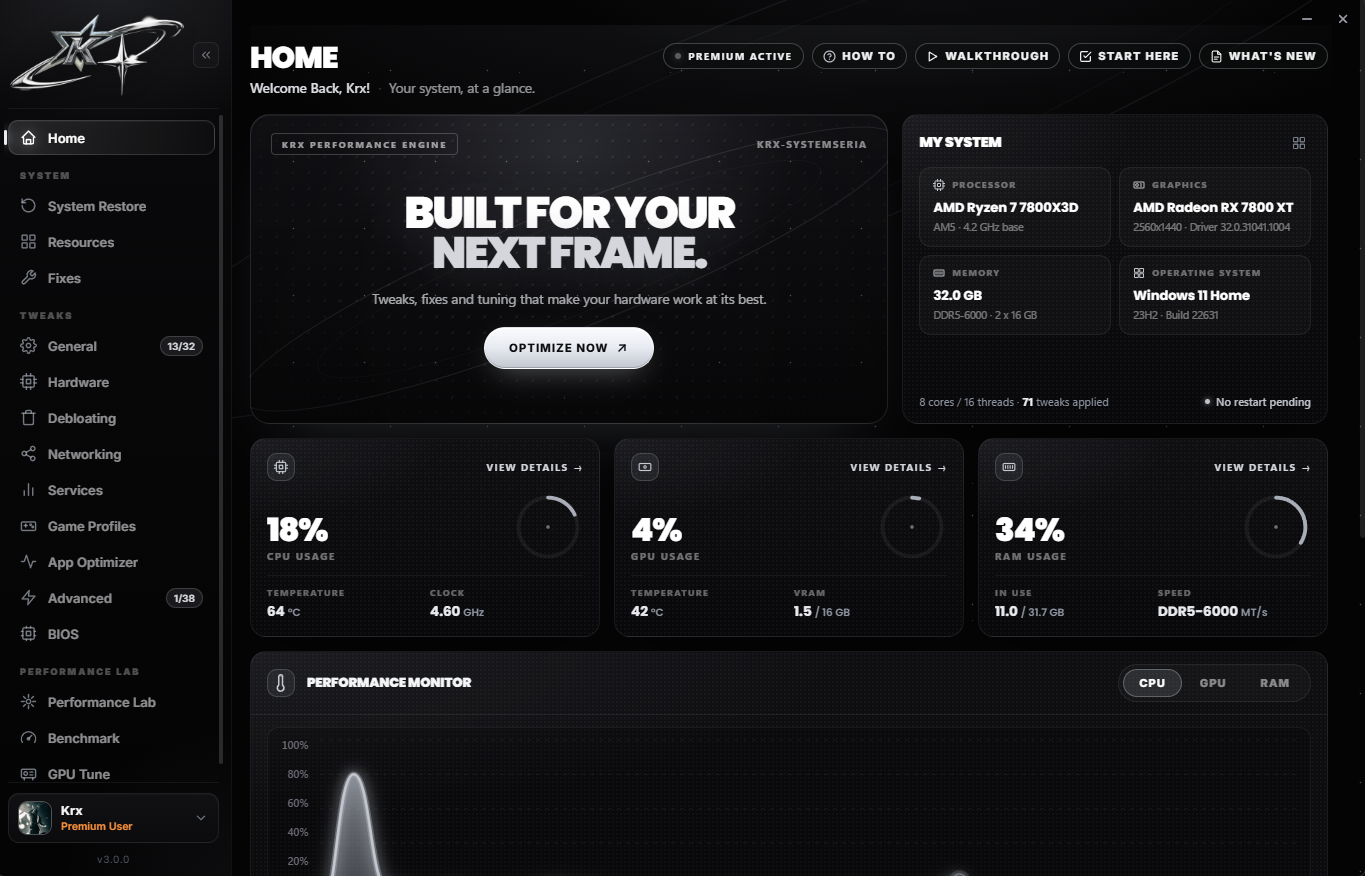
KRX Utility home dashboard
01utility plans

Two ways to run the utility.

Start free and feel the first gains, or unlock every module with one lifetime payment.

Starter
Freeforever

The essentials to clean up Windows and claw back frames on your own.

Restore point before every change
  • Live system dashboard & hardware scan
  • Core Windows gaming optimizations
  • Power plan configuration
  • Basic debloating
  • Real-time CPU, GPU and RAM utilisation with temperatures, clock speeds and a hardware health report covering processor, graphics, memory and OS build.

    Establishes a baseline so every change is measured against how your system actually behaves.

  • Game Mode, Hardware-Accelerated GPU Scheduling, Game DVR / background recording off and Xbox Game Bar control.

    Removes the most common sources of frame-time spikes with safe, reversible defaults.

  • Switch to a high-performance power profile with reduced CPU idle states during gameplay.

    Prevents the processor from down-clocking mid-match, keeping frame delivery consistent.

  • Uninstall unused applications and disable non-essential startup entries — every change can be toggled back on.

    Fewer resident processes free CPU time and memory for the game.

  • Windows temp, user temp, prefetch, recycle bin, recent items and thumbnail caches cleared in one pass.

    Recovers disk space and clears stale data that slows file access.

  • Ready-made competitive presets for popular titles.

    Low-input-lag settings without editing config files by hand.

  • Create a Windows restore point with one click before applying changes.

    A guaranteed rollback path if a setting does not suit your setup.

PremiumWas $45
$30one-time · lifetime

Every module unlocked, deeper tuning and lifetime updates to the app.

Lifetime updates & priority support
  • Everything in Starter
  • CPU scheduler & process priority tuning
  • Timer resolution & latency tuning
  • Interrupt affinity, MSI mode & core parking
  • Every free module included, in the same application — no reinstall required.

    Premium extends the free toolset rather than replacing it.

  • Win32PrioritySeparation quantum tuning, foreground boost, MMCSS (Multimedia Class Scheduler) game-task priorities and system responsiveness values.

    Gives the game thread priority access to CPU time, reducing scheduling delays that read as input lag.

  • High-resolution system timer configuration, dynamic tick and HPET-related settings, plus reduced DPC latency sources.

    Tighter timer resolution produces more consistent frame pacing and lower input-to-photon latency.

  • Message-Signaled Interrupts for GPU, NIC and USB controllers, interrupt affinity assignment and core-parking / C-state control.

    Keeps device interrupts off the cores your game uses and stops cores sleeping mid-frame.

  • TCP/IP stack tuning (Nagle's algorithm, auto-tuning, ACK frequency, RSS), NIC adapter properties (interrupt moderation, flow control, offloads, buffers), QoS policy and DNS optimisation.

    Reduces packet-processing delay and jitter for steadier ping and more consistent hit registration.

  • Standby list cleanup, memory compression and paging behaviour, superfetch / SysMain control and RAM cleaner.

    Prevents stutter caused by memory pressure during long sessions.

  • The complete performance, system and graphics tweak set, including windowed-game optimisations, power throttling off and network throttling off, with apply-all / revert-all.

    Tunes every layer of Windows rather than only the basics.

  • Grouped control of Defender, Windows Update, telemetry, account sync, sharing, Bluetooth discovery, remote access and device sensors — each with a clear explanation.

    Brings background processes down toward 60–70 for a quieter, more predictable system.

  • Logon items, scheduled tasks, diagnostic tracking and update services handled alongside application removal.

    Removes the hidden background activity standard cleaners leave behind.

  • Automated DDU-based clean reinstall with a stripped, debloated driver build, plus GPU tuning and chipset driver installation for AMD and Intel platforms.

    A clean driver stack removes overlays and telemetry that add render latency.

  • Fortnite, Black Ops 6/7, Counter-Strike 2, Apex Legends, Battlefield and more — configs backed up once and locked read-only so games cannot overwrite them.

    Competitive settings persist through game updates.

  • Hardware acceleration, notifications and telemetry disabled in Chrome, Edge, Brave, Opera, Firefox, Discord and Spotify; Discord CPU priority lowered.

    Background apps stop competing with the game for GPU and CPU resources.

  • USB power saving off, input queue sizes and polling-related settings for mouse and keyboard.

    More consistent input delivery from your peripherals to the game.

  • Shader caches (NVIDIA, AMD, DirectX), browser caches, crash dumps and device-level cleanup.

    Clears stale caches that cause hitching after driver or game updates.

  • Repairs for GTA V / FiveM, Rockstar Launcher, Xbox & Game Pass authentication, Valorant Vanguard, Epic Games, Call of Duty, Roblox and more.

    Resolves common launcher and anti-cheat errors without manual troubleshooting.

  • Reads live firmware values — PBO, Curve Optimizer, boost, C-states, memory profile, Infinity Fabric, Resizable BAR and virtualisation — on AM4, AM5 and Intel boards with AMI firmware.

    Shows exactly what your BIOS is running before any tuning decisions.

  • Advanced system options, benchmark tools and before / after reports.

    Verify every change with measurable results.

  • All future application updates and new modules, plus priority assistance in the KRX Discord.

    A single payment that keeps delivering new tweaks and fixes.

02inside the app

Every module, one clean app.

A real look at the KRX Utility — swipe through each screen.

Home
01 / 10

Home

Your system at a glance: CPU, GPU and RAM load, hardware details and a live performance monitor.

Live dashboard

CPU, GPU and RAM usage with temps and clocks.

General tweaks

32 Windows optimizations, apply or revert all.

Debloating

Remove apps and tasks — reversible.

Services

Cut background processes safely.

Game profiles

Competitive configs for top shooters.

App optimizer

Lighter browsers, Discord and Spotify.

Resources

Driver installs and deep cleanup.

Fixes

Launcher and anti-cheat repairs.

BIOS reader

Read real firmware settings.

Restore points

Back up before every change.

krx // download

Grab the utility

Download the installer, run it, and the utility sets itself up in under a minute.

v3.0.0 · Windows 10/11 · 237 MB